English translation of a Persian article from the WebTarget archive. The date above is the original publication date. Some advice, especially technical details, may be outdated.
Every HTML element can be thought of as a rectangular box. These boxes sit alongside one another to form a page layout. The CSS box model describes the parts of each box and how they affect the space an element occupies.
A CSS box consists of content, padding, a border, and a margin. Padding controls the distance between the content and the border. The border forms the edge around the content and padding. Margin controls the space outside that edge, separating the element from its neighbours. The diagram below shows how these parts fit together.
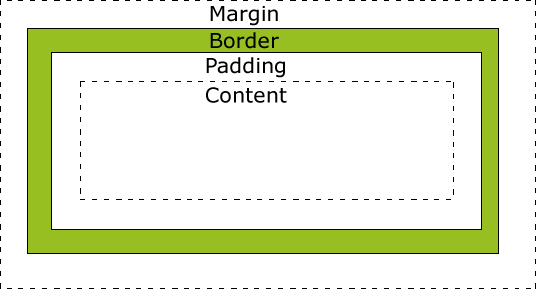
Margin
Margin is the empty space outside a box’s border. You can set it for all four sides at once, or separately for the top, right, bottom, and left. The margin is transparent: the element’s background does not paint this space.
CSS
div {
    margin: 10px;
}
CSS
div {
    margin-left: 10px;
    margin-top: 10px;
    margin-right: 5px;
    margin-bottom: 3px;
}
Border
The border surrounds the content and padding. You can set its
width, colour, and line style.
Technical clarification: an unspecified border
colour uses currentColor, the element’s text
colour, rather than its background colour.
CSS
div {
    border: 1px solid #888;
}
CSS
div {
    border-bottom: 2px solid #070;
    border-left: 2px double #070;
    border-top: 2px dashed #070;
    border-right: 2px dotted #070;
}
Padding
Padding is the space between the content and the inside of the border. Like margin, it can be set for all four sides or for each side individually. An element’s background extends through its padding area.
CSS
div {
    padding: 15px;
}
CSS
div {
    padding-left: 5px;
    padding-top: 20px;
    padding-right: 8px;
    padding-bottom: 7px;
}
Content
The content is what appears inside the box: text, an image, a list, a table, or other material.
Calculating a box’s size
Accurate layouts require an understanding of how width and
height are calculated. Under the default
box-sizing: content-box model,
width and height describe only the
content area. Padding and borders add to the rendered box’s
dimensions, and margins add space outside it. The following
equations describe the total outer space, including margins.
Technical clarification: with
box-sizing: border-box, the declared width and
height already include padding and borders, so do not add them
again. Vertical margins between block elements can also
collapse.
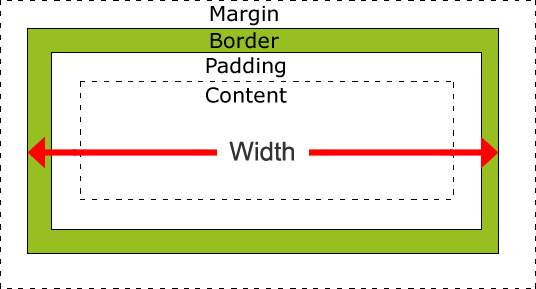
Total outer width = content width + left padding + right padding + left border + right border + left margin + right margin
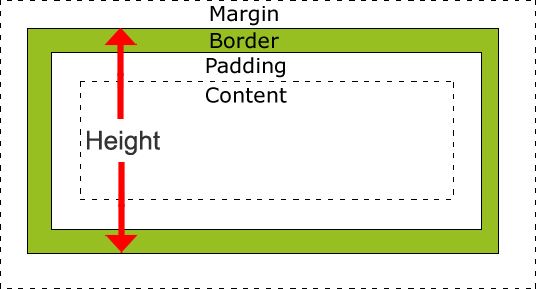
Total outer height = content height + top padding + bottom padding + top border + bottom border + top margin + bottom margin